A conventional PC with a traditional hard drive will see the performance slow down with time, not because of a fault in the hardware but because files are scattering all over the drives. File scattering is referred to as fragmentation.
To solve this, Outbyte Driver Updater includes a disk optimization tool that detects fragmentation and reorganizes data automatically — restoring smooth, fast performance without you doing manual maintenance.
Let’s take a look at how fragmentation really works and why fixing it makes HDDs feel faster instantly.
Why HDDs Slow Down: A Simple Explanation
HDDs store files on rotating magnetic disks. When files are written in a single location, they can be read easily by the HDD head. But over time:
- You install and uninstall programs
- Files are created, edited, and deleted
- Free space becomes messy and scattered
So instead of storing a file in one clean block, Windows pieces it into separate locations across the disk. The drive must physically jump around to collect every fragment — and that delay is what you feel as lag.
Real Example From Outbyte Driver Updater
This is what fragmentation looks like in a scan:
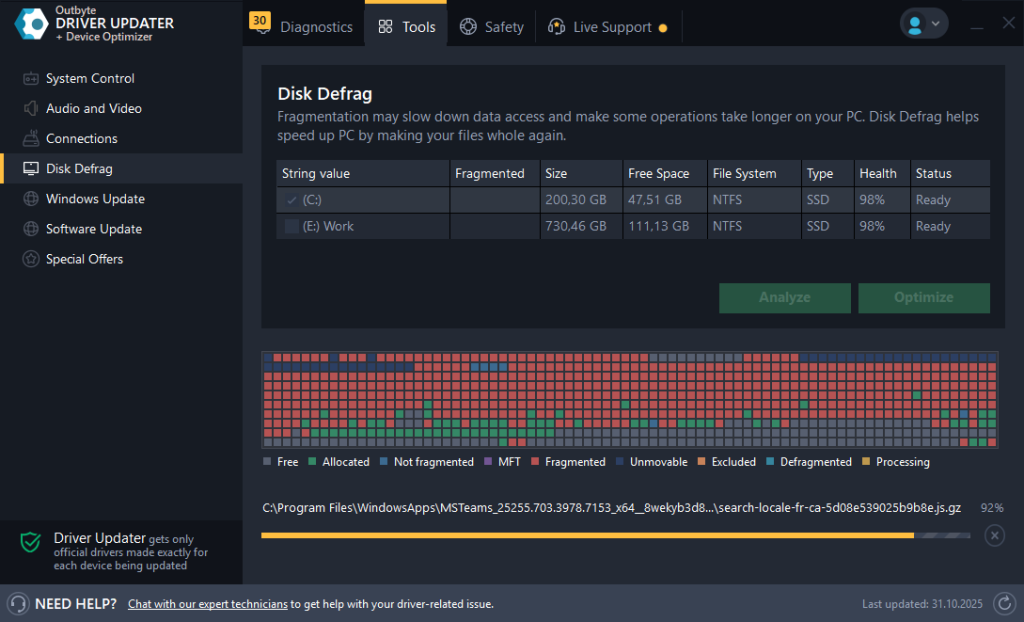
Each block = a cluster of a file.
When these blocks are scattered everywhere, every load takes longer.
Think of reading a book where each page is in a different room — you’ll finish eventually, but much slower.
How Outbyte Defragments HDDs
Defragmentation reorganizes scattered file pieces back into continuous blocks.
This means:
- Faster game and app loading
- Quicker boot times
- Less mechanical wear on the drive
- Smoother everyday tasks
Outbyte identifies the fragmentation level and applies the right fix automatically.
What if this system contains both HDD and SSD drives?
Outbyte preferentially promotes defrag for HDD drives and TRIM for SSD drives. They avoid falling into a common error where an SSD can have its lifespan shortened with defrag.
Keep drives healthy automatically using Outbyte Driver Updater, which applies the right type of optimization for each drive.
How You’ll Notice the Improvement
After defragmentation:
- Icons and folders open faster
- Games reach menus quicker
- Programs stop freezing during launch
- System noise may even decrease
Older laptops, budget desktops, and HDD-based gaming drives benefit the most.
When Should You Defrag?
You’ll see benefits if:
- The PC is more than 3–5 years old
- Boot takes much longer than before
- Disk is more than 70% full
- You use large files (videos, games, photos)
- You see slowdowns after big installs
Keeping fragmentation under control lets HDDs perform the way they were meant to — fast, reliable, and responsive. Outbyte Driver Updater builds this optimization into its toolkit, so HDD users can keep drive performance from slowly degrading over time.
FAQ
Does defrag increase FPS?
No — it improves loading times, not GPU rendering.
Will this fix loud disk noise?
Often yes — the drive head moves less after defrag.
Can fragmentation cause crashes?
If system files are badly fragmented — yes, it can trigger freezes.
Should SSDs be defragged too?
Never — TRIM is what SSDs need. Outbyte handles this automatically.
Is defrag safe during use?
Yes — but performance may dip until the process finishes.








