There is a special feeling you get when you toggle that little switch on your VPN app and watch the connection turn green. It’s a mix of relief and power. In that moment, many users start asking the same question: what does a VPN protect you from? You feel like you’ve just engaged a cloaking device, vanishing from the radar of advertisers, hackers, and government snoops. Like you are now nothing less than a ghost.
I hate to be the one to ruin that feeling, but we need to talk.
Marketing departments have done a spectacular job of selling virtual private networks as a panacea—a magic shield that bounces off everything from NSA surveillance to computer viruses. But the reality of cybersecurity is nuanced, messy, and rarely fits on a billboard.
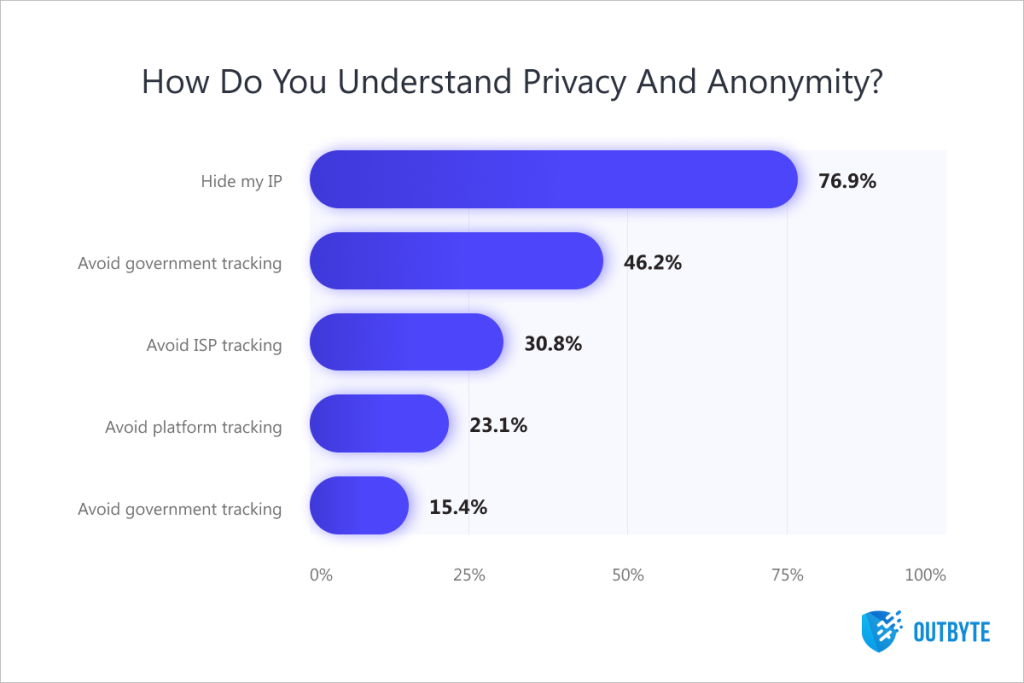
In our recent survey, we found a fascinating disconnect in user expectations. When we asked users what “privacy” meant to them, 30.8% cited “avoiding ISP tracking” as a primary motivation. They are absolutely right to be worried about that. Your internet service provider is essentially a stalker you pay monthly fees to.
However, 23.1% of respondents said they use a VPN to “avoid platform tracking” (like Google, Facebook, or Amazon). This is where the armor develops a crack. While VPN anonymity is a powerful concept, using a VPN to stop Google from tracking you while you are logged into Chrome is like wearing a ski mask to the bank but handing the teller your driver’s license.
To stay protected online in 2026, you need to understand the difference between protecting the pipe and protecting the bucket. A VPN secures the pipe. But if you let someone pour poison directly into the bucket, you’re still going to get sick.
So what does a VPN protect you from really, and where is it helpless? Let’s find out.
Part 1: What a VPN Actually Does
Let’s start with the good news. When used correctly, a VPN is an essential piece of hygiene, like brushing your teeth or not using “Password123.” It handles specific network-layer threats exceptionally well.
Public Wi-Fi
If you walk into a coffee shop, connect to “Starbucks_Free_WiFi,” and start banking, you are playing Russian Roulette with your data. One of the most common attack vectors in 2026 remains the man-in-the-middle (MitM) attack.
While you think you access a legit network, a hacker sits in the corner with a cheap device like a Wi-Fi Pineapple, broadcasting a hotspot with the very same name. You connect to their device, not the router. They then pass your traffic to the real internet, but they record everything that passes through—passwords, session cookies, emails, all of it.
So does a VPN protect you on public Wi-Fi? Yes. In fact, this is the single strongest use case for the technology. When you use a VPN on public Wi-Fi, you create an encrypted tunnel inside the compromised network. Even if the hacker intercepts your data packets, they can’t read them. They see you connecting to a VPN server, and they see a stream of gibberish (encrypted ciphertext). They cannot see that you are logging into your bank.
In that case, is it safe to use public Wi-Fi with a VPN? Generally, yes. It turns a high-risk environment into a zero-trust environment where the security of the local router is irrelevant.
🧠 Also read: How to Choose the Best VPN for Your Device
ISP snooping and throttling
Your ISP sees everything. They know you visit medical websites, they know you torrent files, and they know you stream 4K video at 8 PM every night. In many jurisdictions (hello, UK and USA), they are legally allowed to package this metadata and sell it to advertisers or store it for government access.
Does a VPN stop ISP tracking? Yes. When you connect to a VPN, your ISP can only see one thing: that you are sending encrypted data to a VPN server. They lose the ability to see the destination of your traffic. They know you are driving a car, but they can’t see where you are going or who is in the passenger seat.
The same goes for ISP throttling. ISPs often slow down specific types of traffic, like Netflix or P2P torrenting, to manage congestion. Because the VPN encrypts the packet headers, the ISP cannot distinguish a Netflix stream from a Zoom call. If they can’t identify the traffic, they can’t throttle it based on content.
💡 Quick tip: How to Set Up a VPN at Home (Beginner-Friendly Guide)
IP logging and geoblocking
Every website you visit logs your IP address. This set of numbers identifies your rough geographical location (down to the city or neighborhood) and your ISP.
What can a VPN protect you from here? It swaps your actual IP with the server’s IP (hail to 76.9% of users from our survey who get it right), protecting you from location profiling. And this is why many users turn on their VPNs—to access content locked behind geographic borders, like streaming Netflix libraries from other countries.
💡 Quick tip: What Does a VPN Hide?
Part 2: What a VPN Can’t Touch
Now for the cold shower. There is a massive gap between “network privacy” and “device security.” This is where users get complacent, and this is where VPN virus protection myths need to die.
Browser fingerprinting
A VPN might hide your IP address, but your browser is still screaming your identity.
Browser fingerprinting is a technique where websites query your browser for specific configurations:
- Your screen resolution (e.g., 2560×1440)
- Your installed fonts
- Your battery level API
- Your browser version and user agent
- Your graphics card renderer (canvas fingerprinting)
When you combine these data points, the resulting “entropy” is often unique enough to identify you specifically among millions of users, even if you change your IP address. So does a VPN prevent browser fingerprinting? No. Absolutely not. You are “User ID #99842,” and the tracker knows you just switched from a New York IP to a London IP. You haven’t fooled them; you’ve just changed your clothes.
🧠 Also read: Digital ID and VPNs: How Privacy Fears Reshape Online Behavior
Cookies and “logged-in” tracking
This relates to the 23.1% of users in our survey trying to avoid platform tracking.
Can a VPN protect against tracking cookies? No. A VPN handles the connection, and cookies live in your browser.
If you turn on your VPN, route your traffic through Switzerland, and then log into your Google account, Google knows exactly who you are. You have authenticated yourself. They will track your searches, your YouTube history, and your clicks, and they will associate that data with your profile, regardless of where your IP says you are. A VPN cannot stop you from voluntarily handing over your identity.
🧠 Also read: Age Verification & Digital ID: A 2025 Privacy Reality Check
Malware, ransomware, and viruses
We need to set this straight. Not only are VPN and virus protection distinct apps. These are completely distinct concepts. Does a VPN protect against malware? No, it doesn’t. A VPN encrypts data in transit. It does not scan that data for malicious code (unless you use a specific “Threat Protection” feature offered by some premium providers, and even those are limited compared to dedicated antivirus).
If you visit a shady site and download Free_Minecraft_2026.exe, which contains a trojan horse:
- The VPN encrypts the request to download the file.
- The VPN server downloads the virus.
- The VPN server encrypts the virus and sends it to you through the secure tunnel.
- You decrypt the virus on your device.
- You execute the virus.
The VPN acted as a secure armored truck that safely delivered a bomb to your front door. So does a VPN stop viruses? No. Do you need virus protection with a VPN? Yes, absolutely. You need an endpoint detection and response (EDR) or a solid antivirus to catch the payload once it unpacks on your machine.
Ads
In our survey, 15.4% of those using VPN for privacy flagged avoiding ads.
But can a VPN block ads? No, a standard VPN does not block ads. It encrypts the ad just as securely as it encrypts the rest of the website. However, many modern VPNs now include DNS filtering (often branded as “Threat Protection” or “CleanWeb”). This stops your device from loading content from known ad servers.
- The good: It works on every app, not just your browser. It can stop those annoying banner ads in your mobile games.
- The bad: It is a blunt instrument. It generally cannot stop YouTube video ads (because they come from the same domain as the video), and it often leaves ugly blank boxes on websites where the ads used to be. For a truly clean experience, you still need a dedicated browser extension like uBlock Origin.
🧠 Also read: Best Free VPNs in 2025: Top Secure & Reliable No-Cost Options
Phishing and social engineering
What about human error? Can a VPN protect you from them? Nope.
If you receive an email from a “Nigerian Prince” or a fake PayPal alert and you click the link and type in your password, no amount of encryption will save you. You are securely sending your credentials through the protected tunnel directly to the scammer.
Part 3: How to Actually Stay Hidden
In our survey, 23.5% of users cited “privacy/anonymity” as their main reason for using a VPN. But there is a semantic trap here.
Privacy ≠ Anonymity.
- Privacy: No one can see what you are doing (the VPN provides this).
- Anonymity: No one knows who you are (the VPN struggles with this).
If you want to move from “harder to track” to an “invisible man,” a VPN is just the first step. Here is how you close the gap.
The warrant canary and trust
When you use a VPN, you are shifting trust from your ISP to your VPN provider. Your ISP is regulated by local laws (which might be bad). Your VPN might be in Panama (which is good), but do you know them?
This is why we talk about the warrant canary—a signal that the VPN hasn’t been secretly subpoenaed. Since VPN providers can’t directly say that the FBI or NSA requested logs, they act in reverse, regularly posting a message like, “As of [today’s date], we haven’t been subpoenaed.” If one day this message disappears, you’ll know they have been compromised. So check if your VPN has a canary and when it was last updated.
Aside from the canary, when it comes to VPNs, reputation is everything. Imagine you turn on the app and hit connect. Does your VPN prevent ISP tracking now? Yep, it certainly does. But the thing is, the VPN company can track you too. So you need to be sure their “no-log” promise is pure marketing, and in reality they don’t neatly fold your data into a special little file. Check if they have ever been caught red-handed in any scandals and if their no-logs policy has been verified with independent audits.
🧠 Also read: Your AI Therapist Is Being Wiretapped: The Urban VPN Scandal
Browser compartmentalization
If you do everything in one browser—banking, Facebook, searching for medical advice, and watching YouTube—you are cross-contaminating your identity. Google knows you are the same person who just logged into Wells Fargo because the cookies are sitting right next to each other.
The fix? Use different browsers for different identities.
- Browser A: Chrome or Safari. Use this only for things that require your real identity (banking, Amazon, Netflix). Do not search for sensitive topics here.
- Browser B: Brave, Firefox, or LibreWolf. Configure this to delete all cookies on exit. Use this for random searches, reading news, and browsing Reddit. Never log into a personal account here.
- Browser C: Tor Browser. Use this for anything you truly want to be anonymous.
Not by VPN alone
While total internet anonymity in 2026 is a myth, there’s one tool that goes further than VPNs in that department—The Onion Router, or Tor. Here’s the breakdown of VPN vs. Tor anonymity:
- VPN: You trust one company (the provider). It is fast and good for everyday privacy.
- Tor: You trust mathematics. Your traffic hops through three random volunteer nodes. The entry node knows who you are but not what you want. The exit node knows what you want but not who you are.
But if you want a real pro move: Use Tor over VPN. Connect to your VPN first, then open Tor Browser. This hides your Tor usage from your ISP (who might find it suspicious) while giving you the anonymity of the Onion network.
In terms of Tor vs. VPN privacy, there’s no contest, really. Tor is a decentralized tool that doesn’t log your data and is simply incapable of selling you away to the highest bidder (or the feds)—perfect for whistleblowing and activism against state actors. But it comes with a downside: it is painfully slow, which won’t work for everyday use in 2026, let alone streaming. So a VPN is still indispensable for most cases that don’t require “military-grade” privacy protection.
🧠 Also read: The Great Firewall of Pakistan: How It Is Hunting Down Your VPN
Wrapping Up: What Can a VPN Protect You From?
So, what does a VPN protect you from ultimately? It protects your connection. It protects your data while it is moving through the hostile infrastructure of the internet. It stops the ISP from monetizing your habits, it stops the Wi-Fi hacker from stealing your session, and it stops the government from building a mass-surveillance dragnet of your browsing history.
But it does not protect your endpoint. It doesn’t stop your browser from leaking your identity via fingerprinting, it doesn’t stop malware you voluntarily download, and it doesn’t stop Big Tech platforms from tracking you once you log in.
A VPN is like a bulletproof vest. It is absolutely vital if you are walking into a combat zone. But if you eat poison, or if you shoot yourself in the foot, the vest won’t help you.
Use a VPN. Use it for the risks that involve your ISP and the desire for privacy. Just don’t think it makes you invincible.
FAQs
Does a VPN prevent your ISP from tracking you?
Yes. When you use a VPN, your ISP loses the ability to see which websites you visit, what files you download, or which apps you use. They can only see that you are sending encrypted data to a VPN server. The detailed “clickstream” data they usually package and sell to advertisers is effectively cut off.
How to stop ISP tracking without a VPN?
It is very difficult. You can use Tor Browser, which is effective but slow. You can use encrypted DNS (DoH/DoT), which hides the specific website names from your ISP, but they can still see the IP addresses you connect to. Realistically, a VPN is the only comprehensive tool to stop ISP tracking.
Is it safe to use public Wi-Fi with a VPN?
Yes, using a VPN on public Wi-Fi is highly recommended. It encrypts your traffic so that even if the Wi-Fi network is compromised or fake (the evil twin attack), the attacker cannot read your data or steal your passwords.
Does a VPN protect against malware?
No. VPN virus protection is a myth. While some VPNs offer “Threat Protection” features that block known malicious domains (DNS filtering), they do not scan files for viruses like a dedicated antivirus program does.
Does a VPN prevent browser fingerprinting?
No. Websites can still identify you based on screen resolution, fonts, and battery status. To stop this, you need a privacy-hardened browser (like Brave or Firefox with strict settings) in addition to your VPN.
Can a VPN protect against tracking cookies?
No. If you accept cookies or log into a website, a VPN cannot prevent the site from tracking your activity within that session. You should use Incognito mode in conjunction with a VPN to minimize cookie tracking.







