When it comes to VPNs, there is a universal truth: if you aren’t paying for the product, you are the product. We’ve heard it a thousand times, usually followed by a smug nod from a privacy advocate. But when you are staring at a subscription screen asking for $5 a month for something you can technically get for free on the App Store, that philosophy feels a bit abstract, making you wonder, is a paid VPN worth it?
Let’s make it concrete.In our recent survey, we found a statistic that changes the entire conversation around value. 64.7% of our respondents reported using their VPN every single day. Not once a week to watch a geoblocked soccer game, and not once a month to book a flight. Every. Single. Day.
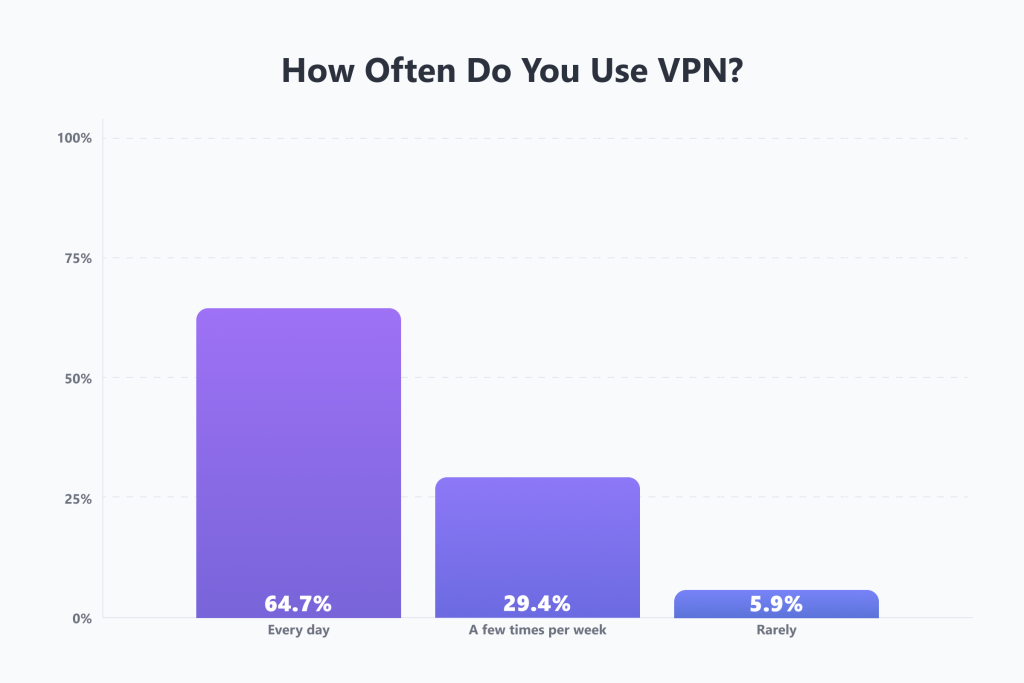
If you use a tool 365 days a year—roughly the same frequency that you use your toothbrush or your coffee maker—the question isn’t “Can I get this for free?” The question should be, “Why would I trust the safety of my daily digital life to a company that isn’t charging me a dime?”
Think of this: a premium, paid VPN service costs less than a single cup of latte per month. Yet, many users cling to free options that throttle their speeds, cap their data, and potentially sell their browsing history to the highest bidder.
So, is paying for a VPN worth it in 2026? Or is it just another subscription bleeding your bank account dry? In this article, we’ll strip away the marketing and look at the ROI of privacy.
🧠 Also read: What a VPN Can and Can’t Protect You From in 2026
Free VPN vs. Paid VPN: What You Are Actually Paying For
When you hand over your credit card details for a paid VPN, you aren’t just buying a software license. You are funding an infrastructure war—in the good sense. The internet is hostile, and keeping a tunnel secure and fast requires massive, continuous investment. Here is where your money actually goes.
Speed stability
If you are part of that 64.7% using a VPN daily, latency is your enemy. Free VPNs are notorious for overcrowding. They might have 50 servers for 5 million users. The result? Buffering, lag, and that spinning wheel of death right when the movie gets good.
Speed starts with stability and is about load-balancing traffic so that you never feel the “crowd.” That’s why any provider that claims to be the best high-speed VPN for daily use invests in server infrastructure (upgrading to 10 Gbps and increasingly 100 Gbps servers). In practice that means you can leave your VPN on 24/7 without noticing a drop in performance. You are paying for the luxury of forgetting the VPN is even there.
The “Netflix tax”
Streaming services like Netflix, Hulu, and BBC iPlayer spend millions developing algorithms to detect and block VPN traffic.
- Free VPNs: They get blocked immediately. They don’t have the budget to replace their IP addresses constantly.
- Paid VPNs: They treat this as an operational cost. When Netflix blocklists an IP, a premium provider spins up a new one instantly. You are paying for a team of engineers whose sole job is to outsmart streaming giants.
💡 Quick tip: Best VPNs for Netflix in 2026
The stealth & power tools
This is the hidden gear that most free users don’t even know exists.
- Obfuscation (stealth mode): In places like China, Iran, or even your strict university Wi-Fi, standard VPN traffic is blocked. Paid VPNs often offer obfuscated servers that disguise your VPN traffic to look like regular HTTPS web browsing. It’s a cloak of invisibility for your cloak of invisibility.
- Double VPN (multi-hop): Routing your traffic through two servers (e.g., France > USA) for twice the encryption. Overkill for Netflix, but essential for whistleblowers.
- Smart DNS: Want to watch U.S. content on your smart TV or Xbox, which doesn’t support VPN apps? Paid VPN services often include the Smart DNS feature to spoof your location on any device without encryption speed loss.
🧠 Also read: Is Big Brother Watching? The Truth About VPN Effectiveness Against Government Surveillance in 2026
The “nice-to-have” bonuses
Modern paid VPNs have evolved far beyond simple IP masking. They are effectively morphing into lite cybersecurity suites.
While a free VPN might just encrypt your traffic, premium services often include ad blockers and anti-malware tools that filter out malicious websites, stop third-party tracking cookies before they load, and wipe out annoying banner ads in your apps and browser.
As a result, you get faster page load times (because you aren’t downloading heavy ad scripts) and an extra layer of defense against phishing sites that would otherwise slip through the cracks—a strong argument for a paid VPN vs. a free one.
Escaping the CAPTCHA hell
Here is a quality-of-life upgrade nobody mentions until they lose it.
Free VPN IP addresses are abused by bots, spammers, and millions of users simultaneously. As a result, Google and Cloudflare flag these IPs as “suspicious.”
- The free experience: Almost every time you search for something, you have to click “I am not a robot” and identify traffic lights for 30 seconds.
- The paid experience: Clean, reputable IPs mean you browse the web like a normal human, without the interrogation.
Support that actually exists
Have you ever tried to get customer support for a free app? You send an email into a black hole and pray.
With a premium service, you are (usually) funding a 24/7 live chat team. If you can’t connect to a server in China or your protocol fails, you have a human to talk to within 60 seconds. That is one of the advantages of a paid VPN over a free VPN that actually makes paying for a VPN worth it.
🧠 Also read: Free vs. Paid VPNs: What’s the Real Difference in 2026?
The Cost of Free VPNs
Let’s be brutally honest: running a global server network costs millions of dollars in bandwidth, electricity, and hardware. If a company offers you a service for free, they have to pay those bills somehow. So how do they make a living if they don’t charge you?
Data mining
In the free vs. paid VPN debate, this is always the first argument in favor of paying for a VPN. Many free providers utilize a business model based on monetization of user data. They inject tracking cookies, log your connection timestamps, and package your browsing habits to sell to third-party advertisers. And using a privacy tool that actively invades your privacy is like buying a home security system from a burglar.
🧠 Also read: Your AI Therapist Is Being Wiretapped: The Urban VPN Scandal
The freemium handcuffs
Not all freebies are bad. But the good ones are just demos. Most safe free VPNs (like Proton Free or Windscribe Free) are honest, but they are restricted by design. The idea behind this is to show you that the service works but limit your experience just enough so that you’d want to upgrade. In this model, premium users are funding the free version.
Here are the common freemium VPN limitations you’ll likely run into:
- Data caps: Most providers offer no more than 10 GB per month (which is about two HD movies).
- Server limits: Access to only a few overcrowded locations, usually without an option to pick one yourself.
- Speed throttling: Some VPNs deliberately slow you down so you don’t get too comfy with the free version and to annoy you into upgrading.
If you’re a daily user, at some point these limitations stop being just inconveniences. They make the internet unusable, leaving you with no other option than to pay up.
🧠 Also read: ISP Throttling: Do VPNs Help Streaming?
Is Paying for a VPN Worth It? VPN ROI Analysis
If we look at the financials, a typical 2-year plan for a top-tier VPN costs around $3 to $5 per month. But is it worth paying for a VPN strictly by the numbers? To answer that, we have to look at what you can’t do with a free version.
1. Saving on flights, hotels, and subscriptions
Here is the dirty secret of free VPNs: they usually only offer servers in “high-trust” nations like the U.S., the Netherlands, or Japan.
Why does that matter? Because those are high-income countries.
If you change your IP to the U.S., flight prices might actually go up. To save money, you need to appear as if you are browsing from lower-income economies like Turkey, Argentina, India, or Vietnam. And premium VPNs generally offer servers in 100+ countries.
A VPN won’t likely save you $150 if you change your IP to Mexico, but one international flight and hotel booking combined with a year of discounted software subscriptions could easily pay for a year of VPN service. A free VPN with three server locations simply cannot play this game.
🧠 Also read: VPN Usage Trends 2025: Which Countries Lead in VPN Adoption?
2. Expanding your streaming library
You already pay $15.49/month for Netflix, $13.99 for Disney+, and maybe more for Prime. But depending on your physical location, you are likely only seeing 40% to 60% of the content libraries those services actually own.
Your free VPN is likely already detected and blocked by each of the above. Paid VPNs promote streaming support as a selling point. By unlocking libraries in the UK, Canada, or Japan, you effectively double the content volume of your existing subscriptions without paying the streaming giants a penny more.
3. Gaming and latency stabilization
If you game, running a free VPN vs. paid VPN comparison is simply inappropriate. The congestion on free servers leads to massive ping spikes and packet loss, making them unusable. Premium VPNs can actually lower your ping in certain scenarios by routing your traffic more directly to the game server than your ISP does. Plus, they offer DDoS protection—essential if you play competitively. You can’t put a price on not lagging out in a ranked match.
🧠 Also read: Types of VPN Explained: How Each Works and Which Is Best for You
Paid VPN Services: Our Top Picks
Enough with the theory. Now, it’s time to look at the actual premium VPNs and see how they stack up.
| VPN | Jurisdiction | Streaming-optimized servers | Device limit | Obfuscation | Smart DNS | Server network & capacity | Ad & malware blockers | Price |
|---|---|---|---|---|---|---|---|---|
| Proton VPN | Switzerland | Yes | 10 (1 on the free plan) | Via the Stealth protocol | No |
| NetShield Ad-blocker |
|
| NordVPN | Panama (owned by a Netherlands-based parent) | No | 10 | Obfuscated servers (via the OpenVPN protocol) | SmartPlay |
| Threat Protection Pro |
|
| ExpressVPN | British Virgin Islands (owned by a UK-based parent) | No | 10–14, depending on the plan | Via the Lightway protocol | MediaStreamer |
| Threat ManagerAd Blocker |
|
| Surfshark | The Netherlands | No | Unlimited | Obfuscated servers (via the OpenVPN protocol) | Yes (U.S. only) |
| Cookie pop-up BlockerClean Web |
|
| CyberGhost | Romania (owned by a UK-based parent) | Yes | 7 | No | Yes |
| Content blocker | From $2.03/mo |
| VyprVPN | USA | Yes | 5 | Via the Chameleon protocol | No |
| No | From $3/mo |
| Private Internet Access (PIA) | USA (owned by a UK-based parent) | Yes | Unlimited | Via proxy | Yes |
| MACE | From $2.03/mo |
| Windscribe | Canada | Yes | Unlimited | Via the Stealth and WStunnel protocols | No |
| R.O.B.E.R.T. |
|
| TunnelBear | Canada (owned by a U.S.-based parent) | No | Unlimited | Yes (GhostBear) | No |
| TunnelBear Blocker |
|
| Hotspot Shield | USA | No | 10 (1 on the free plan) | Via the Hydra protocol | No |
| No |
|
| Norton VPN | USA | Yes | 5–10, depending on the plan | Via the Mimic protocol | No |
| Ad Blocker (browsers only) |
|
| Mullvad VPN | Sweden | No | 5 | Lightweight WireGuard Obfuscation (LWO)QUICShadowsocks | No |
| Ad, tracker, and malware blocker | $5.81/mo |
| PrivadoVPN | Switzerland | Yes | 10 (1 on the free plan) | Via the OpenVPN and WireGuard protocols | Yes |
| Ad BlockerThreat Prevention |
|
| Hide.me | Malaysia | Yes | 10 (1 on the free plan) | Via the OpenVPN protocol | No |
| SmartGuard |
|
| PureVPN | British Virgin Islands | Yes | 10 | Obfuscated servers | Yes |
| Tracker & Ad Blocker |
|
| IPVanish | USA | No | Unlimited | Via the OpenVPN protocol | No |
| Threat Protection |
|
🏆 The value kings
These providers offer the highest return on investment. They combine massive server capacity, unlimited (or high) device limits, and essential quality-of-life features like ad blocking and Smart DNS for a price that makes sense.
1. Surfshark
2. NordVPN
3. Private Internet Access (PIA)
4. ExpressVPN
🥈 The premium daily drivers
Excellent services that lack one specific feature that keeps them out of the top spot.
5. Proton VPN
6. CyberGhost
7. Windscribe
🥉 The specialists & budget picks
Good services that have a specific niche or a few limitations.
8. PureVPN
9. IPVanish
10. PrivadoVPN
11. Mullvad VPN
The “just okay” alternatives
These providers work, but they offer less value (lower speeds, fewer features, or restrictive caps) than the tiers above.
- Hide.me: Decent specs, but no Smart DNS and a modest server network don’t stand out against the top players.
- Norton VPN: Good integration if you use Norton 360, but the browser-only ad blocker is weak.
- TunnelBear: Fun bear animations, but no Smart DNS and a tiny 2 GB cap on the free plan make it more of a toy than a daily tool.
- VyprVPN: Good protocol (Chameleon) for censorship, but a small network (700+ servers) and no Smart DNS.
- Hotspot Shield: Restrictive free plan (500 MB/day), a surprisingly expensive premium tier, and low server capacity (1 Gbps) compared to the 100 Gbps giants.
🧠 Also read: How to Choose the Best VPN for Your Device
So, Is a Paid VPN Worth It?
If you are part of the 35.3% who use a VPN occasionally—perhaps a few times a month to check a bank balance on public Wi-Fi—then no. Stick to Proton VPN’s free tier. It will keep you safe without costing a dime.
But if you are part of the 64.7% who live online, the answer is an emphatic yes.
A free VPN vs. a paid VPN isn’t a fair fight. The moment you pay, you stop being a data point and start being a customer. You get stable speeds that can handle 4K streaming, access to premium tools, and real-time customer support.
In 2026, privacy is a luxury, but at the price of a cup of coffee a month, it is one of the few luxuries almost everyone can afford. Don’t cheap out on your digital safety.
🧠 Also read: Zero-Log VPNs Explained: How to Tell Which Ones Actually Keep Your Secrets
FAQs
Should I pay for a VPN?
Yes, especially if you use the internet daily. The advantages of a paid VPN over free VPN services include significantly faster speeds, unlimited data, access to global streaming content (Netflix, Hulu, etc.), and stronger security protocols. Free VPNs often sell user data or limit performance to unusable levels.
Is a free VPN vs. a paid VPN worth it?
If you need a VPN for a one-time task (like bypassing a specific block for 10 minutes), a reputable free VPN (like Proton or Windscribe) is worth it. For anything else—streaming, gaming, or continuous privacy—a paid VPN is the only viable option. The performance gap is massive.
What is the best high-speed VPN for daily use?
Based on recent speed tests and infrastructure investments (like 100 Gbps RAM-only servers), NordVPN and Surfshark consistently rank as the fastest. They minimize the speed loss typically associated with encryption, making them ideal for daily, always-on use.
What is the best VPN for banking and paying bills?
You need a VPN with strong encryption (AES-256) and a kill switch to prevent data leaks if the connection drops. NordVPN, ExpressVPN, Proton, Surfshark, and Private Internet Access (PIA) are top choices due to their verified security architectures and no-logs policies.







