The outlook error code 0x80040115 always shows up when one tries to send or receive an e-mail on the Outlook platform. This may be due to some cause, whereby this comes with the message “Outlook sending reported error 0x80040115.”
Most of the users of Outlook panic when this error appears, while in fact, there is no reason to do so. There is so much you could do about this, and we share some solutions with you below. Also, we will teach you how to identify the error even if no error message pops up.
What Causes Error code 0x80040115?
Error code 0x80040115 typically appears during Windows installation due to corrupt system files, read/write errors on your disk, or interference from third-party software, like antivirus programs. To better understand why the error appears, here are some of its known causes:
- An oversized PST file – It is likely that a PST file has exceeded its size limit, causing this error. To fix this, try archiving older items or empty your junk and deleted items folders.
- Incorrect Outlook installation – If you did not install Microsoft Outlook correctly, then the 0x80040115 error may appear. Reinstalling Outlook can resolve the problem.
- Internal conflict – Problems within your system can also cause the error to show up. Fixing these internal system errors and conflicts can get rid of error 0x80040115 too.
- Problems with the email server – Sometimes, the Outlook servers are at fault. Perhaps they are experiencing downtime or other problems, resulting in the error. There is nothing much you can do with email server issues. You just need to wait until Outlook’s servers are up and running again.
- A corrupted PST file – If a PST file is damaged or corrupted due to an infection, it can lead to error 0x80040115.
- Slow internet connection – In other cases, the error 0x80040115 can simply be caused by an unstable or poor internet connection. To resolve this problem, make sure that you have a fast and reliable connection or wait until your ISP restores your service.
- Third-party add-ins – If you installed some third-party add-ins on your Outlook account, know that they can trigger the error, too. Uninstalling them temporarily can sometimes fix the problem.
Common Fixes for Error 0x8007045d
Fix #1: Clear the DNS Cache
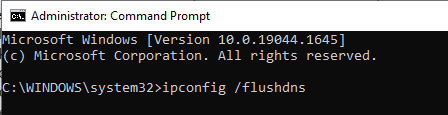
One reason for Outlook error code 0x80040115 could be an outdated DNS cache. Clearing the DNS cache means forcibly removing all the information that has been gathered in your cache. What is left is completely new DNS information. To access your computer’s DNS client cache, do this:
- Open Command Prompt as an administrator.
- Type
ipconfig /flushdnsand press Enter. - Once you’ve flushed your DNS, restart Outlook by going back to Start then Run and typing
OUTLOOK.EXE /cleanrunor clicking on File > Exit then selecting Restart from the dropdown menu.
Sign out of all email accounts. Close Outlook completely. - Sign back into each account one at a time until you find which one is causing issues with Outlook not sending emails correctly.
Fix #2: Launch Outlook in Safe Mode
In safe mode, Outlook starts with very basic settings and no add-ins. If it runs fine in safe mode, you know that your issue is caused by a third-party add-in, a virus scanner setting, or another problem in your system configuration.
If not, go ahead and close Outlook completely—this time leaving it closed until you’re ready to troubleshoot it further. Here’s how to launch Outlook in Safe Mode:
- Press Windows + R, type
outlook /safe, and hit Enter. - If Outlook works fine, disable unnecessary add-ins.
Fix #3: Change Your Outlook Profile Settings
Sometimes, the error stems from corrupt profile settings:
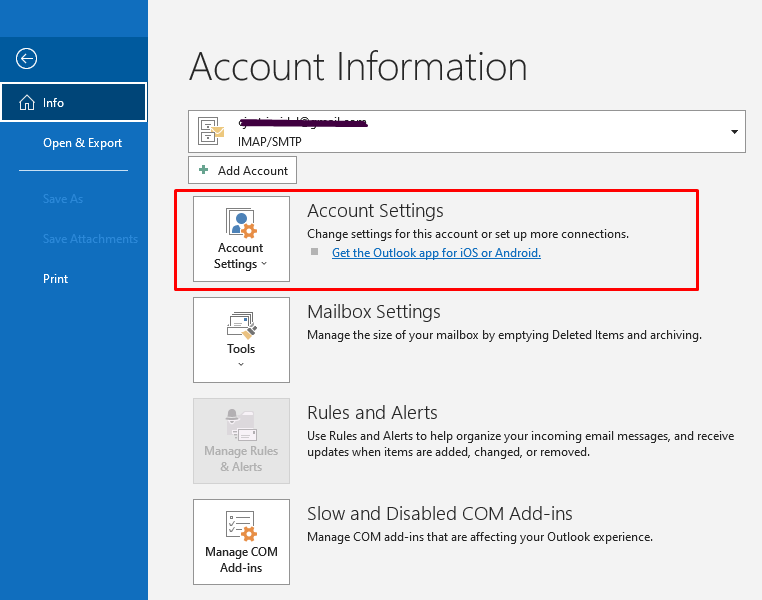
- Open Control Panel > Mail > Show Profiles.
- Select your profile, click Remove, then add a new profile.
- Restart Outlook and reconfigure your settings.
Fix #4: Disable Your Antivirus
Your antivirus software might be interfering with Outlook’s connection to the server. Temporarily disable it to see if this resolves the error. Remember to turn it back on afterward.
Fix #5: Repair the Outlook Installation
A corrupted Outlook installation can also cause errors. To repair it:
- Open Control Panel > Programs and Features.
- Select Microsoft Office, then click Change.
- Choose Quick Repair or Online Repair and follow the prompts.
Fix #6: Use the ScanPST.exe Tool
Microsoft has developed a tool called ScanPST.exe that can assist in fixing Outlook PST files that are corrupt or damaged.
The tool is located on your computer’s hard drive at %ProgramFiles%\Common Files\Microsoft Shared\OFFICE12 (or OFFICE14) as a self-extracting zip file named scanspst.exe.
Do not use any other version of ScanPST.exe because using another version may cause data loss or other problems with Outlook 2007, Outlook 2010, and Office 365.
When you run scanpst.exe in Windows Vista, Windows 7 or Windows 8, you will be prompted with the User Account Control permissions dialog box; click Yes to continue. After that, click the Start button and hit Repair once the scanning has been completed. Restart your computer then.
Fix #7: Reset Your Browser
Outlook may sometimes rely on browser settings. Resetting your browser could resolve connectivity issues:
- Open your browser’s settings.
- Look for the option to Reset or Restore settings.
- Restart your computer and Outlook.

Fix #8: Delete Temporary Files
Temporary files can interfere with the working of Outlook. To delete them:
- Press Windows + R, type
%temp%, and press Enter. - Delete all the files present in the temporary folder.
Or you can use an Outbyte PC Repair tool to remove unnecessary junk and temporary files. This is the fastest and safest method to get rid of extra bloat in your system.
Fix #9: Delete Cloud-Based Messages Stored on Microsoft Servers
Messages stored on the server may be causing syncing issues if your mailbox is hosted on a cloud service. Remove problem messages directly from the server via OWA.
Fix #10: Delete Email Messages
Sometimes an email message goes haywire in such a way that stops Outlook from syncing. Look for suspicious emails or the ones that are too large in size and remove them to test if it eliminates the error.
Don’t leave yet—these guides might help too:
What is the LiveKernelEvent Code 141 and How to Deal With It?
Fix Windows 10 Update Error 0x800703F1
How to Fix Windows Error Code 0x8007232B
FAQs
Why does Error 0x80040115 occur on installation?
It mainly occurs due to some disk errors or corrupt files, and sometimes external devices used in the installation.
Do antivirus programs hamper installation?
Yes, these programs sometimes block important processes that are vital during installation. Thus, it is recommended to turn them off for some time.
What should I do if my disk contains bad sectors?
Run the chkdsk command and it will try to repair all bad sectors.
I’ve tried so, but should I try reinstalling Windows in Safe Mode?
Yeah, because Safe Mode only loads those necessary drivers and services. Thus, it has a very low chance of software conflict during installation.








