If you were to walk down a busy city street shouting your home address, social security number, and a list of your medical conditions through a megaphone, people would think you’ve lost your mind. Yet, this is effectively how most of us browse the internet.
Without protection, your data travels across the public web “naked.” It leaves your device, hops through your router, travels across your internet service provider’s (ISP) infrastructure, and bounces through a dozen public servers before reaching its destination. At every checkpoint, someone can look at the payload.
But there’s a tool that can help your data “dress up”—a VPN.
Marketing teams love to sell VPNs as magic invisibility cloaks. They promise that once you click “Connect,” you become a ghost—untraceable, unreachable, and completely anonymous. The reality, as always, is more nuanced. A VPN is not magic. It is more like an armored car with tinted windows for your data packets. It doesn’t make you disappear, but it does make the cargo you are carrying impossible to read while it’s in transit. But what does a VPN hide exactly, and perhaps more importantly, what does a VPN not protect you from?
Let’s set the “military-grade” and other marketing buzzwords aside and look at what exactly gets hidden, distinguishing between true privacy and the illusion of anonymity.
Does a VPN Hide Your Identity?
Every device that connects to the internet is assigned an IP address—that’s your device’s license plate. And it doesn’t just identify your device. It anchors you to a specific physical location and ties your activity directly to your ISP account billing name.
So does a VPN hide your IP? The answer is a resounding yes. This is the primary function of the tool. Wondering how a VPN hides your IP address? Here is the breakdown:
- Without a VPN: You type outbyte.com into your browser. Your request, stamped with your home IP address (e.g., 192.168.1.55), travels to the website’s server. The website logs that 192.168.1.55 visited at 2:00 PM.
- With a VPN: You connect to a VPN server in Switzerland. Your request is encrypted and sent to the VPN server first. The VPN server scrubs off your IP address and stamps the request with its own (e.g., 185.200.1.1) before forwarding it to the website.
To the outside world—whether that’s a website administrator, a tracker, or a hacker—the traffic is coming from a data center in Zurich, not your living room in Ohio.
💡 Quick tip: How to Set Up a VPN at Home (Beginner-Friendly Guide)
Why does this matter?
- Anti-doxxing: It prevents malicious actors from resolving your IP address to a physical location.
- Breaking the profile: Ad networks build profiles based on IP continuity. By constantly rotating IPs, you fragment their data.
- Identity masking: Does a VPN hide your identity completely? No, but it hides the technical identifier that links your traffic to your real-world persona.
🧠 Also read: Types of VPN Explained: How Each Works and Which Is Best for You
Does a VPN Hide Your Internet Activity?
The entity with the most terrifying amount of data on you isn’t Google or Facebook—it’s your ISP. Because they own the pipes, they can see exactly where the water flows.
In the U.S., UK, and parts of the EU, ISPs are legally allowed (and sometimes required) to log the domains you visit. They know you bank with Chase, read The New York Times, and endless-watch Netflix at 2 AM. In some jurisdictions, they can even legally sell this “anonymized” data to marketers.
So, does a VPN hide your activity from your ISP? Yes. When you use a VPN, you wrap your data packets in an encrypted layer—that’s called VPN tunneling.
- Before VPN: Your ISP reads the packet header: “Requesting access to www.outbyte.com.”
- After VPN: Your ISP reads the packet header: “Encrypted gibberish sending data to VPN server 44.”
Your ISP can still see that you are using a VPN. They can see the volume of data you are consuming. But they are completely blind to the destination and content of your traffic.
But it’s not just the ISP. If you are using public Wi-Fi at a coffee shop or airport, the network administrator (or a hacker sitting nearby with a packet sniffer) can monitor unencrypted traffic. So does a VPN hide browsing history from the Wi-Fi owner and protect you on an open network? Absolutely. To the Wi-Fi router, your connection looks like a single, unintelligible stream of data. They cannot see which sites you are visiting or intercept your session cookies.
Who sees what?
| Who’s watching | Without a VPN | With a VPN |
|---|---|---|
| Your ISP | Everything (domains, timestamps, unencrypted data) | Only that you are connected to a VPN |
| Wi-Fi admin | Domains, device name, unencrypted data | Only that you are connected to a VPN |
| Websites | Your real IP, location, ISP name | VPN server IP, VPN location, data center name |
| Government | Metadata via ISP logs | Encrypted data (unless they demand logs from the VPN) |
🧠 Also read: ISP Throttling: Do VPNs Help Streaming?
Does a VPN Hide Your Location?
We live in a “splinternet.” What you see on Netflix in the U.S. is different from what you see in Japan. News sites accessible in France might be blocked in other regions. This segregation is enforced through geo-IP filtering.
So how does using a VPN hide your location? Just like everything else—it spoofs your real IP address with that of the VPN server you’re connecting to. This way, when you connect to a server in London, the internet treats you as a British resident. This allows you to:
- Bypass censorship: If a government firewall blocks a certain website, a VPN helps you tunnel under the wall to a server in a country where that website isn’t blocked.
❓ Can a VPN be used to bypass internet censorshipin highly restrictive regimes like China or Russia?
Yes, but these nations often employ deep packet inspection(DPI) to identify and block VPN protocols themselves. You need a VPN with obfuscated servers to mask the VPN traffic as regular HTTPS traffic.
- Compare prices: Airline tickets and subscription services often display different prices based on user location.
- Avoid sports blackouts: If a game is blacked out in your local city, a VPN can make you appear to be viewing from out of state.
The mobile caveat: Does a VPN really hide your location?
It’s not all so rosy when it comes to mobile users. Does a VPN hide your location on an iPhone and Android? The answer is generally yes, but there’s a nuance. While a VPN hides your IP-based location, it does not hide your GPS data. If you give an app like Google Maps or Pokémon GO permission to access your GPS, they will see your physical location regardless of your VPN connection.
But this is not necessarily a dead end. Some premium VPN providers offer a GPS spoofing feature on Android devices that can match the coordinates to the VPN server, so they can trick even such meticulous checks.
🧠 Also read: How to Choose the Best VPN for Your Device
What a VPN Doesn’t Hide
This is the section most VPN providers wouldn’t want to share. The thing is, your IP address is just one of many fingerprints you leave behind. So what does a VPN not protect you from?
Browser fingerprinting
Even with a hidden IP, websites can identify you by the unique configuration of your browser—your screen resolution, installed fonts, battery level, and browser version—all collectively called browser fingerprinting. A VPN cannot alter this data.
Active logins
If you log into your Google account while connected to a VPN, you’re literally turning yourself in, so Google knows it is you. Does a VPN hide your browsing history from Google if you are logged into Chrome? Nope. They are tracking the account, not just the connection.
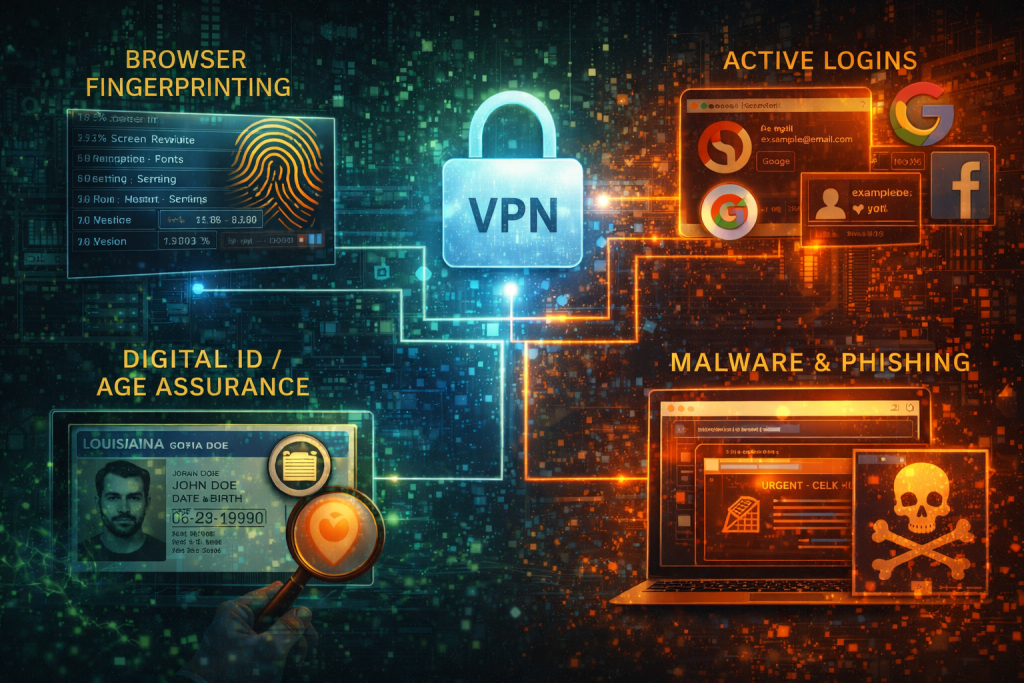
Digital IDs and age assurance
In 2026, the internet is increasingly asking for your papers, not just your IP. A VPN’s effectiveness here relies entirely on how the check is performed.
- Where it works (soft checks): If a website uses age estimation based on your IP address location or simple self-declaration, a VPN works perfectly. You can route through a country with laxer laws to bypass the prompt.
- Where it fails (hard checks): Against the new wave of government-mandated digital IDs, a VPN is powerless. If you are in Louisiana or Utah, or facing Australia’s new age verification laws, you are often required to upload a government ID or perform a face scan. A VPN cannot forge a passport. Similarly, the EU’s Digital Identity Wallet verifies who you are, rendering your where irrelevant.
🧠 Also read: Digital ID and VPNs: How Privacy Fears Reshape Online Behavior
Malware and phishing
Going back to basics, what does a VPN protect you from? Surveillance and interception. But it doesn’t replace an antivirus that can shield you from downloading a virus or clicking a phishing link in an email. If you download a malicious .exe file, the VPN will encrypt it while it travels to your computer, but it will still execute once it arrives.
The “free” VPN trap
If you aren’t paying for the product, ask yourself who is. There are a handful of trustworthy freemiums that are safe to use, but many free VPNs claim to hide your data from the ISP, only to collect it themselves and sell it to the highest bidder. Even though such a VPN hides an IP address from the website, your privacy is still compromised.
💡 Quick tip: Free vs. Paid VPNs: What’s the Real Difference in 2026?
Can someone track you with a VPN?
The answer to that question largely depends on who that “someone” is:
- A random hacker? No. Your encryption is too strong.
- An advertiser? Yes, via cookies and browser fingerprinting.
- The government? Maybe. If you use a VPN based in a 5/9/14 Eyes jurisdiction (like the U.S. or UK), the government can subpoena the VPN provider for connection logs. This is why choosing a provider in a privacy-respecting jurisdiction and with a strict no-logs policy—audited by third parties—is critical.
🧠 Also read: VPN Usage Trends 2025: Which Countries Lead in VPN Adoption?
The Bottom Line: What Does a VPN Protect You From?
We’ve talked about the advantages and the limitations of VPNs, so let’s recap what they can and what they cannot do.
What does a VPN hide? It hides the where and the what of your internet traffic, erases the footprints that lead back to your router and scrambles the messages you send. VPN is an essential tool for digital hygiene, much like locking your front door. It keeps the casual snoops, the greedy ISPs, and the mass surveillance dragnets out of your living room.
But it is not a cure-all. It doesn’t stop you from oversharing on social media, it doesn’t scrub your GPS data on an iPhone, and it doesn’t prevent you from logging into tracked services.
Privacy in 2026 isn’t about finding a single off switch for the internet. It’s about layering your defenses. And while a VPN is the solid foundation of that wall, you still have to watch the windows.
FAQs
Does a VPN hide my MAC address?
No, but it doesn’t matter as much as you think. Your MAC address is a hardware identifier seen only by your local router. It does not travel across the internet to the websites you visit. The VPN hides your IP, which is the identifier that actually travels.
Does a VPN hide browsing history from the router?
Absolutely. Whether it’s your home router or a public hotspot, the hardware simply passes the data along. With a VPN, that data is encrypted before it ever reaches the router. The network admin can see that a connection exists and how much data is moving, but they cannot see which websites you are visiting or what files you are downloading.
Can an ISP track data usage with a VPN?
Yes. A VPN hides the nature of your traffic, not the volume. If you have a monthly data cap, a VPN will not prevent you from hitting it. In fact, due to encryption overhead, you might even hit it slightly faster.
How do I ensure my VPN hides my real IP address?
Don’t just trust the app. Connect to the VPN, then visit a site like https://outbyte.com/web-tools/what-is-my-ip/.If the location shown matches your physical house, the VPN is leaking. If it shows a different country, you are secure.
Does a VPN hide your location on Find My iPhone?
No. That service uses the device’s GPS and Bluetooth chips, which operate independently of your network traffic.
Does a VPN hide your location on Life360?
No. Life360 relies on GPS permissions. To hide from these, you need a GPS spoofer.







