It’s 7:30 p.m. on a Friday. You’ve just sat down with a pizza, fired up Netflix, and are ready to binge that new series everyone is talking about. You pay for a 500 Mbps connection—enough bandwidth to stream 4K video on ten screens simultaneously. Yet, the moment the opening credits roll, the quality drops to a pixelated mess, and the dreaded spinning circle appears.
You run a speed test. It shows a blazing fast 480 Mbps. You go back to Netflix. Buffer.
Welcome to the world of ISP throttling. The reality is that your internet service provider (ISP) isn’t necessarily running out of bandwidth. Most likely, they are shaping it, prioritizing certain types of traffic (like VoIP) over others (like P2P or streaming) to prevent network congestion.
But what is ISP throttling exactly? It is the deliberate slowing down of your internet speed by your ISP based on what you are doing online. In this article, we are going to look at the mechanisms behind this digital discrimination and explain how to stop ISP throttling using the only tool that can restore the speed you’re already paying for: a VPN.
Why ISPs Throttle Streaming
To answer the question, “Why is my ISP throttling me?” you have to follow the money. ISPs operate on thin margins and massive infrastructure costs. To them, your 4K stream isn’t “entertainment,” but a cost center.
Peering conflicts
When you watch YouTube, the data doesn’t float magically from Google’s servers to your house. It travels across physical cables and passes through peering points—intersections where different networks exchange traffic.
Video traffic is heavy. It clogs these intersections. If an ISP has a weak peering agreement with Netflix or YouTube, that incoming flood of data costs them money or congests their network nodes. Rather than upgrading their infrastructure (which is expensive), it is far cheaper to simply throttle that specific type of traffic.
The upselling incentive
The second reason is purely cynical: marketing. If your “Standard” tier internet creates a seamless experience, you have no reason to upgrade. By artificially choking high-bandwidth activities like streaming or gaming during peak hours, ISPs create a problem for which they conveniently sell the solution: a “Gamer” or “Streamer” package with prioritized traffic.
What hurts the most is that they aren’t giving you faster internet—they are just agreeing to stop slowing you down.
How ISP Throttling Works: The Dark Arts of Traffic Management
You might wonder, “How does my ISP know I’m watching Netflix and not just downloading a large PDF?” It’s not magic, and there isn’t a guy in a server room flipping a switch. It is an automated, industrial-scale system of surveillance and control.
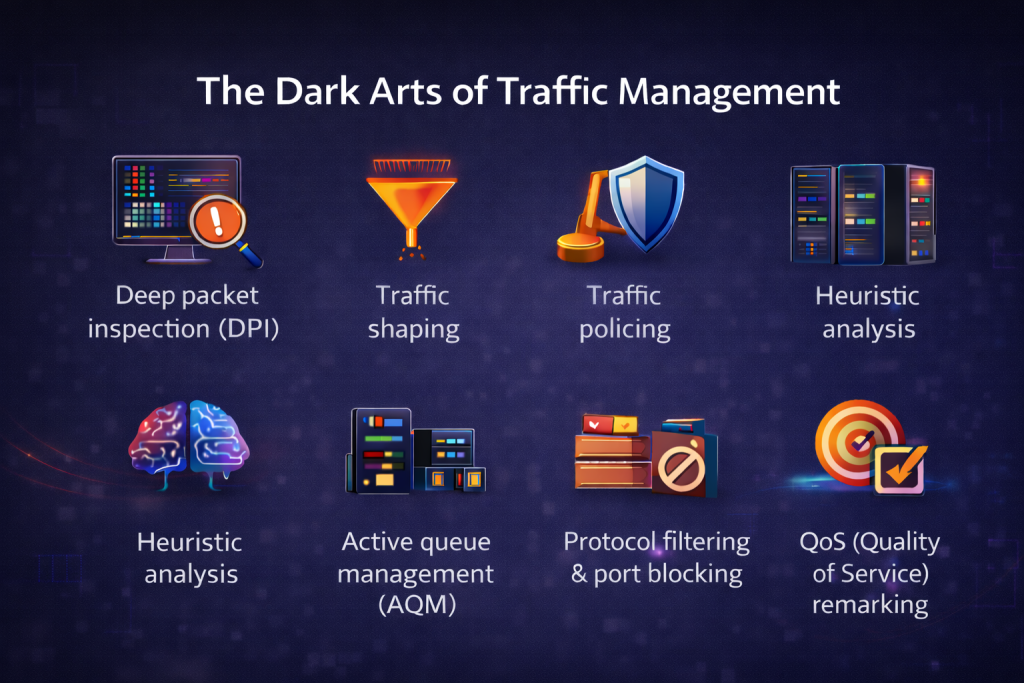
ISPs use a stack of sophisticated networking algorithms to identify, categorize, and manipulate your data in real time. Here is the toolbox they use to keep you in the slow lane:
Deep packet inspection (DPI)
This is the “nuclear option” of traffic management. Standard routing only looks at the packet header (the “envelope”) to see the destination IP. DPI looks at the payload (the “letter” inside). Even with HTTPS encryption, ISPs can use DPI to analyze the TLS handshake and Server Name Indication (SNI) fields, which often reveal exactly which website or service you are connecting to (e.g., netflix.com or steampowered.com) before the encryption fully kicks in.
Traffic shaping
Also known as “packet smoothing.” Instead of dropping data that exceeds a limit, the ISP holds it in a memory buffer and releases it at a specific rate. This adds latency (lag) but keeps the connection alive. ISPs use traffic shaping to smooth out “bursty” traffic, ensuring that your sustained 4K stream never exceeds a specific speed limit, causing that inevitable buffer wheel.
Traffic policing
Unlike shaping, which delays packets, policing simply deletes them. If your data stream exceeds the allowed bandwidth, the router strictly drops the excess packets. This forces your computer to ask for the data again, creating a jagged, “sawtooth” performance pattern where your quality snaps from HD to pixelated mush and back again.
Heuristic analysis
What if you are using encryption that hides the website name? ISPs switch to heuristics. They look at the pattern of your traffic.
- Streaming: Steady, high-volume flow of large data packets.
- Gaming: Rapid-fire burst of tiny packets.
- VoIP: Constant stream of small, time-sensitive packets.
- Torrents: Multiple simultaneous connections to random IPs.
If it walks like a duck and quacks like a duck, the ISP treats it like a duck—and throttles it, even if they can’t technically read the “duck” label on the packet.
Active queue management (AQM)
AQM is a technique where the ISP’s router randomly drops a small percentage of packets before the bandwidth pipe is actually full. This signals your computer’s TCP protocol to “back off” and slow down transmission speed. It is a subtle way to degrade performance without a hard cap.
Protocol filtering & port blocking
This is the “clumsy” method. ISPs may assign lower priority to specific internet ports.
- Port 80/443: Standard web traffic (usually high priority).
- Ports 6881–6999: Traditionally used for BitTorrent and are often throttled heavily.
- UDP throttling: Some ISPs throttle UDP traffic that’s used for gaming and streaming while leaving TCP alone, as UDP consumes more resources on their network switches.
Peering congestion
Sometimes, the ISP doesn’t touch your line at all. Instead, they simply refuse to upgrade the physical cables connecting their network to content providers like Netflix or YouTube. When 8 p.m. hits, this specific intersection gets jammed. The ISP hasn’t applied a software limit to you, but they have deliberately allowed a physical bottleneck to form that effectively throttles that specific service while leaving the rest of the web fast.
QoS (Quality of Service) remarking
Data packets have a field called DSCP (Differentiated Services Code Point) that marks their priority. ISPs often ignore your requested priority or remark your high-bandwidth traffic to the lowest possible priority, ensuring it yields to everyone else on the network.
The speed test illusion
Then why does Speedtest.net show 500 Mbps when I check if my ISP is throttling me? This sophisticated machinery explains exactly why the speed test lies.
ISPs are smart enough to allowlist the IP addresses of popular speed testing sites. So, when the DPI sees you connecting to a speed test, it temporarily disables all the shaping and policing rules mentioned above and opens the floodgates to show you a beautiful, maximum-speed number, creating the illusion that the network is fine. But the moment you close the test and click “Play” on a movie, the throttle clamps down again.
A VPN: The Ultimate Solution to Bypass ISP Throttling
We’re used to thinking of a VPN as a tool to protect privacy, and in today’s world of digital IDs and age verification laws at every turn, it’s no wonder VPNs are gaining momentum. But this is different. This is where they become a performance tool that can stop ISP throttling.
💡 Quick tip: Digital ID and VPNs: How Privacy Fears Reshape Online Behavior
When you turn on a VPN, two things happen that trick your ISP’s throttling mechanisms:
- Encryption blindfold: A VPN encrypts your entire data payload. It wraps your traffic in a layer of code that looks like gibberish. Your ISP can still see that you are sending data, but thanks to the encryption, they can no longer read the packet headers. They cannot distinguish between a 4K video stream, a Zoom call, or a file download. It all looks like generic HTTPS traffic.
- Bypassing peering points: Instead of your data traveling through your ISP’s congested peering point with Netflix, it travels to the VPN server first. If your ISP is throttling traffic from Netflix, they won’t throttle traffic from your VPN provider.
Basically, encryption forces the ISP to treat your traffic neutrally. This is why using a VPN to stop throttling is so effective—since the ISP can’t tell whether you’re streaming video or simply browsing, they don’t flip the throttle switch.
🧠 Also read: Types of VPN Explained: How Each Works and Which Is Best for You
When a VPN Won’t Help
But before you rush to install one, let’s manage expectations. A VPN is a scalpel, not a magic wand. There are scenarios where encryption will do nothing for your speed—or might even make it worse.
If your internet is slow because the physical cables in your neighborhood are melting from overuse, no amount of software will fix that. Here is the cheat sheet to know if a VPN will actually solve your specific problem:
| Throttling method | Will a VPN help? | Why? |
|---|---|---|
| DPI (content-based) | Yes | Encryption helps prevent the ISP from identifying the traffic as Netflix or YouTube. |
| Protocol & port blocking | Yes | VPNs tunnel traffic through standard web ports (like 443), effectively bypassing blocks on specific P2P or gaming ports. |
| Peering congestion | Yes | The VPN routes your traffic through a different path, bypassing the deliberately congested intersection between your ISP and the content provider. |
| QoS remarking | Yes | Since the ISP cannot identify the stream as video, they cannot tag it with a low-priority label. Your traffic stays in the neutral lane. |
| Traffic shaping | Mostly | Shaping often targets specific “bursty” behaviors. A VPN wraps your traffic in a consistent encrypted stream, making it harder for the ISP to detect and smooth out high-bandwidth activities. |
| Heuristic analysis | Mostly | While advanced heuristics can sometimes spot a VPN, it usually masks the specific app patterns. |
| Traffic policing (data caps) | No | If you hit your total monthly data allowance and your ISP starts dropping packets to enforce a limit, a VPN cannot help. Volume is volume. |
| Active queue management | No | If the router is dropping packets because the physical pipe is full, encryption cannot create more bandwidth. It might even add overhead. |
If your base connection is 5 Mbps because you live in a rural area with bad copper wiring, setting up a VPN won’t magically turn it into fiber optics. But if you have a fast line that acts slow only on specific sites or at specific times, that is a smoking gun for artificial ISP throttling—and that is exactly what a VPN is built to defeat.
But before blindly committing to a paid VPN subscription you may not need, here’s the ultimate ISP throttling test: if you turn on a VPN and your Netflix stream suddenly snaps from 480p to 4K, you have your answer. You were being throttled, and you just beat the system.
The Verdict: How to Stop ISP Throttling
If you are tired of buffering and looking for how to beat ISP throttling, the strategy is simple: hide your activity.
Whether it’s through traffic shaping, peering congestion, or DPI, the ISPs rely on knowing what you are doing to decide how fast your internet should be. By using a VPN to bypass throttling, you take that knowledge away from them, forcing them to treat your traffic like any other secure web browsing.
Ultimately, when you encrypt your connection, you strip the ISP of the ability to discriminate against your traffic, ensuring that the only limit on your streaming quality is the speed of the line you paid for.
FAQs
Is ISP throttling illegal?
It depends on where you live. In the EU, net neutrality laws generally forbid ISPs from throttling specific services, though “traffic management” loopholes exist. In the U.S., the net neutrality landscape has been a ping-pong match of regulations, and currently, ISPs have significant leeway to manage traffic as they see fit, provided they disclose it (usually in the fine print no one reads).
Can a VPN bypass ISP throttling?
Yes. A VPN encrypts your traffic, preventing the ISP from seeing that you are streaming or gaming, so they cannot apply their targeted slowdowns. It is the most effective way to stop ISP throttling.
How to tell if my ISP is throttling me?
The best ISP throttling test is a comparison. Run a video on a streaming site without a VPN. Then, turn on your VPN and run the test again. If there’s less lag and the quality is significantly better with a VPN, your ISP is likely throttling video traffic.
Does using a VPN stop buffering on YouTube and Netflix?
If the buffering is caused by artificial ISP throttling, yes, it will stop it almost instantly. If the buffering is caused by your Wi-Fi router being too far away or your base internet plan being too slow, a VPN will not help.
Will a VPN slow down my streaming?
Technically, it can, because encryption requires processing power and adds a small amount of overhead. However, if your ISP is throttling you, the VPN will actually make your streaming faster by bypassing the throttle. Keep in mind that generally, a VPN makes the internet slower, so check your server location and always connect to a server geographically close to you for the best speeds.







